Setting up a new Android phone often feels exciting, but it is also easy to miss a few important features that can significantly improve daily use.
Many of Android’s most helpful tools are not switched on by default, leaving users unaware of what their devices can really do. From better security to smarter notifications, here are some essential Android settings worth enabling as soon as you unbox or reset your phone.
Notification History: Never Miss an Alert Again
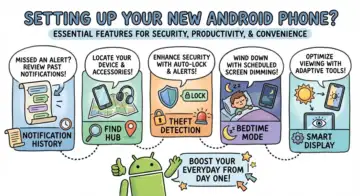
One of Android’s most underrated features is Notification History. Despite being around for several years, it remains disabled on many devices. Once turned on, it allows users to view past notifications that were accidentally dismissed or cleared. This can be extremely useful when an important message or alert disappears before you have time to read it. Since the feature only tracks notifications after it is enabled, it is best to activate it early to avoid missing anything important in the future.
Find Hub: A Crucial Safety Net
Google’s Find Hub, previously known as Find My Device, is not always activated by default, yet it plays a vital role in protecting your phone. Once enabled, it allows you to locate, lock or erase your device remotely if it is lost or stolen. It can also track compatible accessories such as earbuds and trackers. Without setting this up in advance, you may lose the ability to recover your phone when it matters most.
Theft Detection for Added Protection
Android now offers enhanced theft protection features designed to keep your data safe even if your phone falls into the wrong hands. These tools can automatically lock your device when suspicious activity is detected, such as sudden loss of network connection. Remote locking options add another layer of protection, ensuring your personal information remains secure. Activating these features early can make a big difference during a stressful situation.
Bedtime Mode for Better Rest
Constant notifications can disrupt sleep and increase screen time late at night. Bedtime mode helps reduce these distractions by silencing notifications, dimming the display and even switching the screen to greyscale. Users can still allow priority alerts through a whitelist, making it a practical balance between rest and accessibility. It is a simple way to encourage healthier phone habits without completely disconnecting.
Gboard Clipboard and Adaptive Tone
For those using Gboard, enabling the built-in clipboard can be a major productivity boost. It allows users to save and reuse copied text or images, while automatically clearing sensitive content after a short time. Meanwhile, Adaptive Tone, available on select devices, adjusts screen colour based on surrounding light to reduce eye strain. When combined with other eye comfort settings, it creates a more natural viewing experience throughout the day.