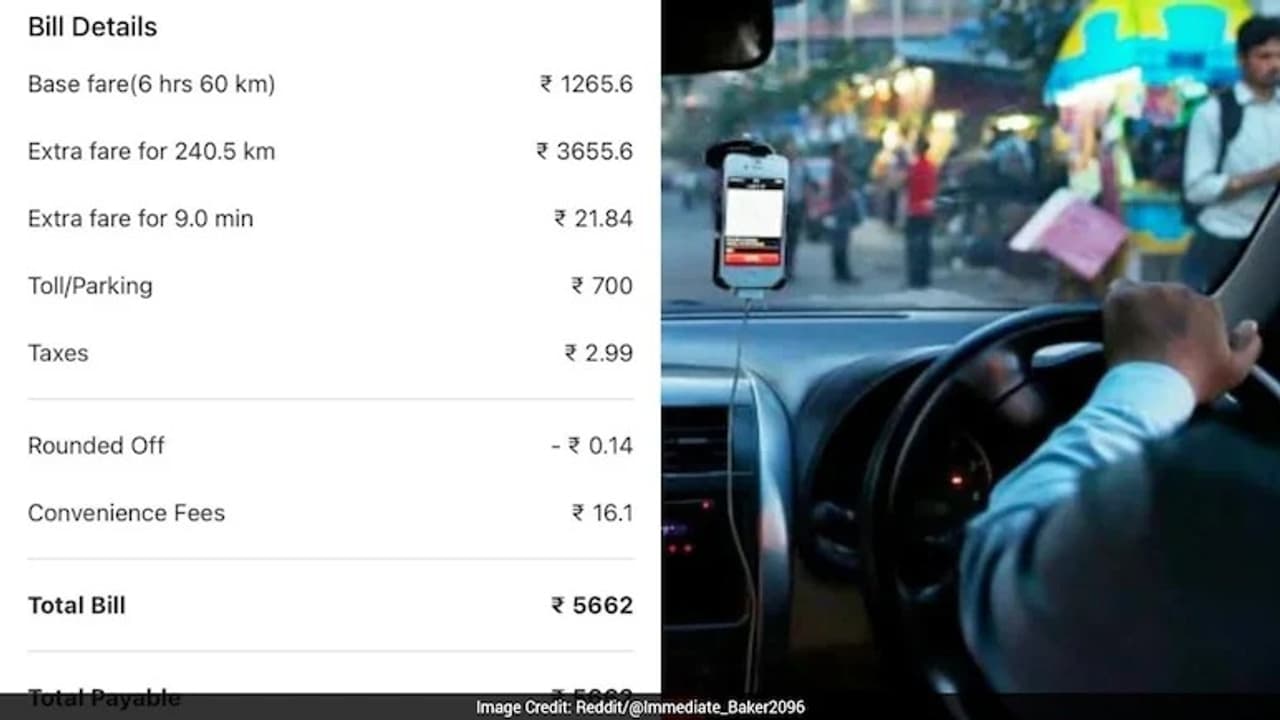
A group of friends in Delhi got a massive shock after their Ola ride. They booked a 6-hour rental package for a 60 km trip but ended up with a bill of ₹5,662, which included a mysterious 240 km extra charge. To make things worse, Ola’s customer care was unreachable.
New Delhi (Aug 29): A group of friends in New Delhi had a nightmare experience with the online cab service ‘Ola’. They booked a cab for a 6-hour rental package, which had a 60 km limit. The group planned to go from their hotel in Mahipalpur to an exhibition at Yashobhoomi, and then head straight to the Indira Gandhi International (IGI) Airport. They made the booking at 10 in the morning.
When they booked the cab, the app showed a base fare of ₹1,285. So, the passengers naturally thought the final bill would be somewhere around that amount. However, when they reached the airport at 3:45 PM, the driver showed them the final bill, and they were left speechless.
Extra Charge of 240 km Added!
The final bill was a whopping ₹5,662, almost four times the expected amount! When they checked the receipt, they found that besides the toll charges, Ola had added a charge for an extra 240.5 kilometres. “We only travelled about 60 km. We have no idea how an extra 250 km charge was added,” the frustrated passengers wrote on social media.
Ola Customer Care Didn’t Respond
The passengers immediately tried to contact Ola’s customer care to sort out the issue. But they had no luck. Since it was a weekend, they couldn’t get through to a human representative. Frustrated and with no answers, they posted a screenshot of the bill on social media, asking for help.
Advice from Netizens
The post quickly went viral, and many users slammed Ola for its poor service. One user suspected, “The driver probably took the car for a ride elsewhere while you were at the exhibition instead of just parking it.” Another person shared a similar story, saying, “I faced a similar scam with Ola at Delhi airport. Email them all the details and also call their security/support department through the app.”
Another user gave a smart tip: “Use your Google Timeline as proof to show you weren’t in the car and that the driver was on a free ride. You can get your money back.”